

MetaTrader 4
صدّر سجل حسابك من MetaTrader 4 ككشف حساب HTML واستورده إلى Tradeways.
MetaTrader 4
استورد المعاملات المغلقة من كشف حساب MetaTrader 4 بصيغة HTML.
التصدير من MetaTrader 4
- افتح MetaTrader 4 وحدد نافذة Terminal في الأسفل.
- افتح علامة التبويب Account History.
- انقر بزر الفأرة الأيمن داخل السجل وحدد الفترة التي تريد تصديرها.
- انقر بزر الفأرة الأيمن مرة أخرى واختر Save as Report.
- احفظ كشف الحساب كملف HTML.
الرفع إلى Tradeways
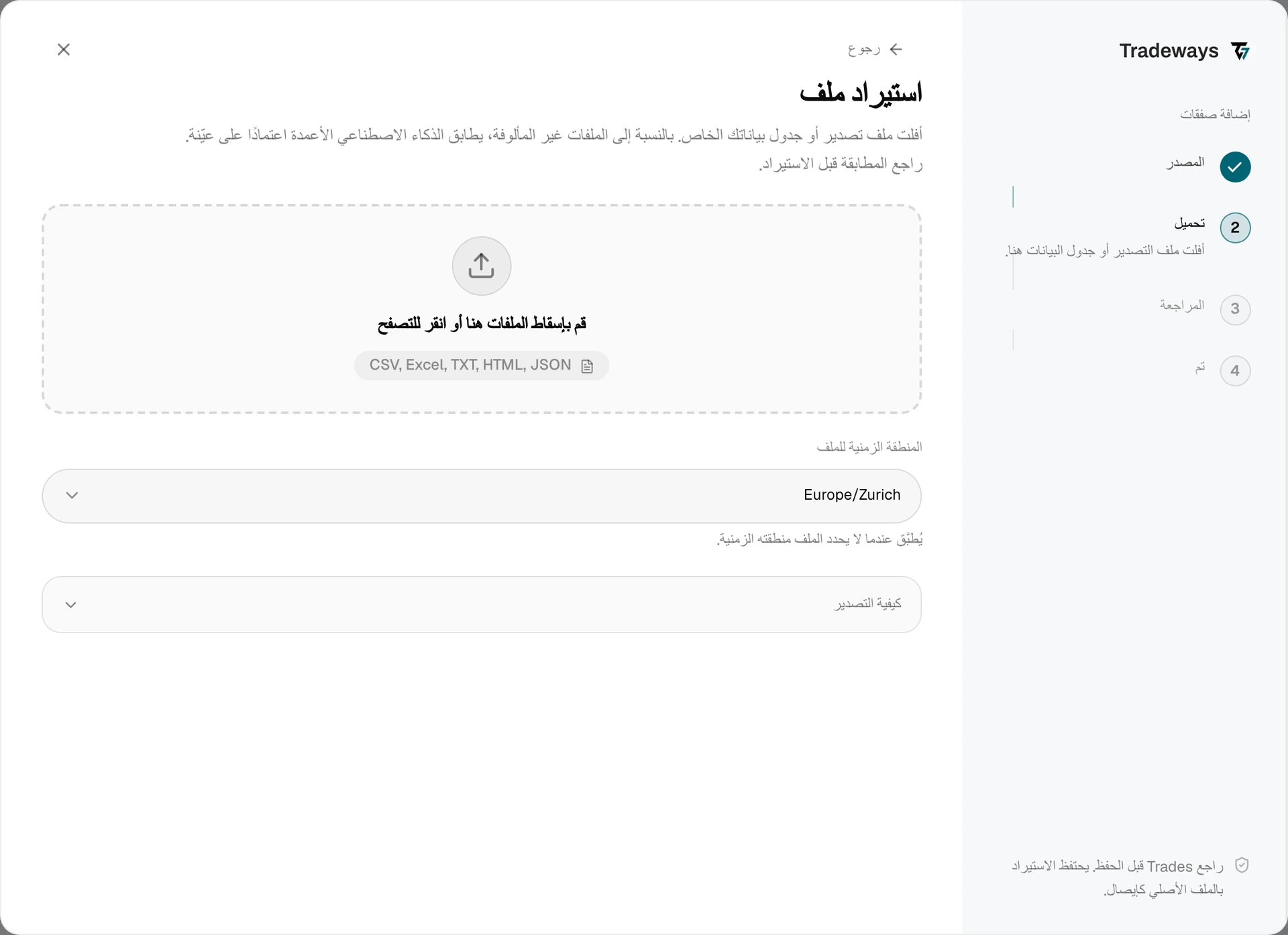
- في سجل الصفقات، حدد إضافة صفقات، ثم حدد تحميل الملف.
- ضمن المنطقة الزمنية للملف، حدد المنطقة الزمنية لخادم MetaTrader 4. لا يحتوي كشف الحساب على منطقة زمنية. تنقل المنطقة الزمنية الخاطئة التنفيذات إلى جلسة أو يوم تداول آخر.
- اسحب ملف HTML وأفلته في منطقة الرفع، أو حدده من جهازك.
- راجع المعاينة وتحقق من عدد التنفيذات والصفقات المجمعة.
- أكد الاستيراد.
يتعرّف Tradeways على هذا التصدير من تخطيطه ويقرأه بالقواعد الواردة في هذه الصفحة. يُقرأ الملف الذي لا يتبع هذا التخطيط كتخطيط غير معروف: يطابق Tradeways أعمدته، ولا تنطبق هذه القواعد. راجع استيراد Trades.
رقم تذكرة MT4 هو مفتاح التكرار. يمكنك رفع كشف حساب متداخل مرة أخرى بأمان.
متطلبات الملف
- استخدم كشف الحساب بصيغة
.htmlأو.htmالذي تنتجه Save as Report. كشوف الحساب المفصلة من الأدوات الأخرى غير مدعومة. - يحتاج كشف الحساب إلى عناوين الأعمدة الإنجليزية:
TicketوOpen TimeوTypeوSizeوItemوPriceوClose TimeوCommissionوTaxesوSwapوProfit. - يقرأ Tradeways قسم Closed Transactions. تُقرأ الملفات بترميز UTF-8 وUTF-16.
- تُكتشف عملة الحساب من ترويسة كشف الحساب.
البيانات المدعومة
تصبح كل معاملة مغلقة تنفيذ دخول وتنفيذ خروج، مع الحجم باللوتات وأسعار الفتح والإغلاق وطوابع الفتح والإغلاق الزمنية. تُجمع العمولة والضرائب كتكلفة للصفقة. تُحفظ المبادلة والنتيجة التي أبلغ عنها Broker للمطابقة.
تُزال لاحقات الرموز: بادئة # أو .، ورمز Broker لاحق مثل .ecn أو .raw. يصبح #AAPL هو AAPL، ويصبح EURUSD.ecn هو EURUSD.
القيود
- لا تُستورد الصفقات المفتوحة. تظهر الصفوف ضمن Open Trades على أنها متخطاة. أغلق المركز أو استخدم الإدخال اليدوي.
- تُتخطى الصفوف غير الخاصة بالتداول. لا تتضمن صفوف الرصيد والائتمان والإيداع نوع
BuyأوSell، لذلك تعرضها المعاينة على أنها متخطاة. - المنطقة الزمنية للخادم. تستخدم طوابع MT4 الزمنية ساعة خادم Broker. تحقق من وقت الخادم في Terminal عندما لا تعرف المنطقة الزمنية التي يجب تحديدها.
للمزامنة التلقائية بدلًا من رفع ملف، راجع MetaTrader.